# Request Indexing
> Monitor and request Google indexing for your pages
Canonical Origin: https://requestindexing.com/
**Agent Skills:**
Skills an agent can install from this site. The index at https://requestindexing.com/.well-known/agent-skills/index.json carries a sha256 digest for each one.
## LLM Resources
- [Full Content](https://requestindexing.com/llms-full.txt): Complete page content in markdown format.
## Agent Skills
- [Agent Skills index](https://requestindexing.com/.well-known/agent-skills/index.json): Every published skill and its sha256 digest.
- [google-indexing](https://requestindexing.com/SKILL.md): Choose the supported way to ask Google to crawl a URL, and read the result without overclaiming. Covers the Google Indexing API, Search Console URL Inspection, sitemaps, and the free Request Indexing tools. Use when the user wants a page indexed by Google, asks about the Indexing API, or wants to check whether Google has indexed a URL.
---
- **Page:** Free Google Indexing Tools · Request Indexing
- **Source:** https://requestindexing.com/tools
- **Description:** Free tools to check if your pages are indexed by Google, audit your site's index coverage, and diagnose indexing problems. No signup required.
```yaml
meta:
og:image: https://requestindexing.com/_og/s/o_b51e4c08d674689f.png
og:image:height: "600"
og:image:type: image/png
og:image:width: "1200"
```
**Free tools **
# **Indexing answers, ***without the signup.*
Three single-purpose tools to check, audit, and diagnose your Google indexing. No account, no email, no tracking.
[
**Google Index Checker**
Check whether Google has indexed one URL. The checker looks for the page in Google search results.**Single URL****Instant****No signup**Open tool](https://requestindexing.com/tools/google-indexing-checker) [
**Bulk Indexing Checker**
Check up to 10 URLs at once. Paste a list or give it your sitemap, then export the results as CSV.**Bulk****Sitemap****CSV**Open tool](https://requestindexing.com/tools/bulk-indexing-checker) [
**Site Indexing Report**
An indexing report for any domain: estimated indexed pages, ranking keywords, and recommendations.**Domain audit****Health score****Recommendations**Open tool](https://requestindexing.com/tools/site-indexing-report)
**Workflow **
## **Start free. Automate when it stops scaling. **
**01 **
**Spot-check URLs **
Start with the single-URL checker to see whether one page is in Google.
**02 **
**Audit your site **
Run the bulk checker and the site report to find where coverage leaks across the property.
**03 **
**Automate submission **
Sign up to submit job posting and livestream URLs through the Indexing API. Other pages need [URL Inspection or a sitemap](https://requestindexing.com/indexing-api-for-blog-posts) instead.
## **Need to fix indexing at scale?**
Request Indexing sends your eligible pages straight to Google's Indexing API. Free and open source.
[Get Started Free](https://requestindexing.com/pro/onboarding) [Read the guides](https://requestindexing.com/guides)
```json
{"@context":"https://schema.org","@graph":[{"@id":"https://requestindexing.com/#website","@type":"WebSite","description":"Monitor and request Google indexing for your pages","name":"Request Indexing","url":"https://requestindexing.com/","publisher":{"@id":"https://requestindexing.com/#identity"}},{"@id":"https://requestindexing.com/tools#webpage","description":"Free tools to check if your pages are indexed by Google, audit your site's index coverage, and diagnose indexing problems.","name":"Free Google Indexing Tools","url":"https://requestindexing.com/tools","@type":["WebPage","CollectionPage"],"isPartOf":{"@id":"https://requestindexing.com/#website"},"potentialAction":[{"@type":"ReadAction","target":["https://requestindexing.com/tools"]}],"primaryImageOfPage":{"@id":"https://requestindexing.com/#logo"}},{"@id":"https://requestindexing.com/#identity","@type":"Organization","name":"Request Indexing","url":"https://requestindexing.com","logo":{"@id":"https://requestindexing.com/#logo"}},{"@id":"https://requestindexing.com/#logo","@type":"ImageObject","caption":"Request Indexing","contentUrl":"https://requestindexing.com/favicon.svg","inLanguage":"en","url":"https://requestindexing.com/favicon.svg"}]}
```
---
- **Page:** Privacy Policy · Request Indexing
- **Source:** https://requestindexing.com/privacy
- **Description:** We value your privacy and want to be transparent about how we handle your information.
```yaml
meta:
og:image: https://requestindexing.com/_og/s/o_fa29d5ac3d851b4b.png
og:image:height: "600"
og:image:type: image/png
og:image:width: "1200"
```
# **Privacy Policy**
We value your privacy and want to be transparent about how we handle your information.
## What We Collect
We gather some basic info to make our service work better for you. This includes stuff like your email address and how you use our site. We only collect what’s necessary to improve your experience.
## How We Use Your Data
Your data helps us personalize your experience and keep things running smoothly. We use it to fix bugs, improve functionality, and keep you logged in so you don’t have to bother entering your details every time.
## Cookies
Yes, we use cookies. You can manage them in your browser settings if you like.
## Analytics
We use the anonymous analytics provided by [Fathom Analytics](https://usefathom.com/) to see how our tool is doing. This helps us scale and improve without getting nosy.
## Your Rights
You’ve got control over your info. Want to delete your account or see what data we have on you? Just hit the button on your account page or reach out to us.
## Keeping Your Data Safe
We take your privacy seriously. We don’t collect sensitive info, and we encrypt authentication tokens to keep them secure. Your trust is important to us.
## Changes to This Policy
We’ll let you know about any major changes to this policy via email or a notice on our site. It’s a good idea to review this page periodically to stay informed.
## Got Questions?
If you have any questions about this privacy policy or how we handle your data, feel free to reach out at [harlan@harlanzw.com](mailto:harlan@harlanzw.com).
```json
{"@context":"https://schema.org","@graph":[{"@id":"https://requestindexing.com/#website","@type":"WebSite","description":"Monitor and request Google indexing for your pages","name":"Request Indexing","url":"https://requestindexing.com/","publisher":{"@id":"https://requestindexing.com/#identity"}},{"@id":"https://requestindexing.com/privacy#webpage","@type":"WebPage","description":"We value your privacy and want to be transparent about how we handle your information.","name":"Privacy Policy","url":"https://requestindexing.com/privacy","isPartOf":{"@id":"https://requestindexing.com/#website"},"potentialAction":[{"@type":"ReadAction","target":["https://requestindexing.com/privacy"]}],"primaryImageOfPage":{"@id":"https://requestindexing.com/#logo"}},{"@id":"https://requestindexing.com/#identity","@type":"Organization","name":"Request Indexing","url":"https://requestindexing.com","logo":{"@id":"https://requestindexing.com/#logo"}},{"@id":"https://requestindexing.com/#logo","@type":"ImageObject","caption":"Request Indexing","contentUrl":"https://requestindexing.com/favicon.svg","inLanguage":"en","url":"https://requestindexing.com/favicon.svg"}]}
```
---
- **Page:** Request Google Indexing and See Why Pages Are Not Indexed · Request Indexing
- **Source:** https://requestindexing.com/
- **Description:** Request Google indexing for your pages, then see which URLs Google has indexed, which it has not, and the reason it gives. Free and open source.
```yaml
meta:
og:image: https://requestindexing.com/_og/s/c_Splash.png
og:image:height: "600"
og:image:type: image/png
og:image:width: "1200"
```
**Free during beta · Open source **
# **Get your pages ***indexed***. **
Check Google's indexing status across your Search Console properties. For ordinary pages, use [**URL Inspection or a sitemap **](https://requestindexing.com/indexing-api-for-blog-posts). For job posting and livestream pages, submit URLs through Google's [**Indexing API **](https://developers.google.com/search/apis/indexing-api/v3/quickstart). Keep your history past Google's 16-month window.
[Get started free](https://requestindexing.com/pro/onboarding) [** View source **](https://github.com/harlan-zw/requestindexing.com)
**What it does **
## **Indexing shouldn't be ***luck***. **
Submit to the Indexing API from your dashboard, see every Search Console property side by side, and keep your history after Google drops it at 16 months.
**Indexing API **
### **Notify Google directly. **
A successful Indexing API notification tells Google it may recrawl the URL soon. Google supports the API for job posting and livestream pages. Publishing an ordinary blog post? [Request indexing with URL Inspection or a sitemap](https://requestindexing.com/indexing-api-for-blog-posts) instead.
**200 publish requests/day****Per-page status****One click from your dashboard**
### **Every site, one tab **
Verified Search Console properties, indexing rate, and impressions in a single dashboard. No more switching accounts to compare.
### **History beyond 16 months **
Search Console only shows the last [16 months](https://gscdump.com/learn-google-search-console/limits/16-month-data-retention) of data, and older days age out every day. Request Indexing keeps your history past that window, searchable and exportable.
### **Open, portable, yours **
MIT on GitHub. Self-host on Cloudflare with your own Google OAuth app if you'd rather own the full stack.
### **Sitemaps, tracked **
What you declared, what Google discovered, and what drifted between the two: one view instead of Search Console's own report.
**How it works**
## From Search Console to indexed in four steps
Connect your Google account once, submit URLs to the Indexing API, and see what Google reports for each one. No dark arts.
**01****Connect**
### **Sign in with your Google account**
One OAuth sign-in. We read your Search Console data. The only changes we make there are a sitemap submission and a property you add and verify.
- Search Console read access, plus sitemap submission
- Revoke any time from your Google account
- Tokens encrypted at rest
accounts.google.com
**Choose an account **
to continue to Request Indexing
Search Console access, plus sitemap submission
**02****Sync**
### **See every site in one place**
Every verified property in one list, with its indexing rate and Search Console metrics. No more switching tabs.
- Totals across every property you own
- Filter by domain, path, or status
- History kept past Google's 16 months
**Your sites**
**3 verified **

**nuxtseo.com**
91 of 119 indexed
76%

**harlanzw.com**
78 of 112 indexed
70%

**mdream.dev**
54 of 204 indexed
26%
**03****Submit**
### **Submit URLs to the Indexing API**
Submit any URL from your dashboard with one click. We respect Google's 200/day publish quota so you don't have to track it yourself.
- New and updated URLs
- Duplicate submissions skipped for 48 hours
- Google supports the API for job posting and livestream pages
POST /v3/urlNotifications:publish** 200 OK **
```
# Submit a URL to the Indexing API
curl -X POST \
-H "Content-Type: application/json" \
-H "Authorization: Bearer $TOKEN" \
--data '{
"url": "https://example.com/new-page",
"type": "URL_UPDATED"
}' \
indexing.googleapis.com/v3/urlNotifications:publish
```
**04****Track**
### **See what Google does next**
Your dashboard shows the index status Google reports for each URL, read through gscdump. No more refreshing Search Console.
- Status per URL
- Coverage over time
- Indexed, not indexed, and the reason Google gives
**Indexing timeline**
today
/jobs/frontend-developer** Submitted **09:14
/jobs/frontend-developer** Crawled **10:42
**/jobs/frontend-developer**** Indexed **14:28
Illustrative activity. Notification receipt and index status are separate.
**Free tools**
## Check indexing without signing up
Three single-purpose tools for a quick answer. No account, no email, no tracking.
**Google Index Checker**
Check whether Google has indexed one URL. No account needed.
[Google Index Checker](https://requestindexing.com/tools/google-indexing-checker)
**Bulk Indexing Checker**
Paste up to 10 URLs or a sitemap, check them in one run, and export the results as CSV.
[Bulk Indexing Checker](https://requestindexing.com/tools/bulk-indexing-checker)
**Site Indexing Report**
A report for any domain: estimated indexed pages, ranking keywords, and recommendations.
[Site Indexing Report](https://requestindexing.com/tools/site-indexing-report)
[**View all free indexing tools **](https://requestindexing.com/tools)
**Learn **
## **Understand the API, then automate it. **
[**All guides **](https://requestindexing.com/guides)
[**Start here **
**The complete Google Indexing API guide **
What the API supports, what a notification response means, when Google requires approval, and how it differs from URL Inspection.**Read the guide **](https://requestindexing.com/google-indexing-api) [
**Step-by-step tutorial **
Create a Google Cloud project and service account, give it Search Console ownership, and send your first eligible notification.**Follow tutorial **](https://requestindexing.com/google-indexing-api-tutorial) [
**Node.js implementation **
Send one URL\_UPDATED notification with googleapis, read the failures, and tell notification metadata apart from index status.**See the code **](https://requestindexing.com/google-indexing-api-node-js) [
**Bulk URL submission **
Send eligible URLs one request at a time, see how multipart batches differ, and keep a result for every URL.**Read pattern **](https://requestindexing.com/bulk-submit-urls-google-indexing-api) [
**Quota & rate limits **
200 publish requests a day, 180 metadata reads a minute, the Pacific Time reset, and how a tool's own limit differs.**Read limits **](https://requestindexing.com/google-indexing-api-quota)
Weighing another tool? Read [how Request Indexing compares with Indexly and SEO Gets](https://requestindexing.com/comparisons) or what replaces the closed Tag Parrot.
**Data preservation **
## **Google is deleting** **your data. **
After 16 months, your Search Console history is gone: seasonal patterns, year-over-year comparisons, all of it.
**Keep it past 16 months **
Request Indexing keeps your history after Google drops it. Export it any time.
**Own your data **
Export it, or delete it. It's yours.
> **Search Console keeps data for the last 16 months. As a result, SEO reports in Analytics also include a maximum of 16 months of data. **
**Built in the open **
## **No paywall, no surveillance, no lock-in. **
**MIT **
Released on GitHub. Built with Nuxt by a Nuxt core team member.
**Minimal data **
We collect what's needed to make the product work. Delete it any time.
**Encrypted **
At rest and in transit for every sensitive field, including OAuth tokens.
## Questions?
[Understand Google Search timelines](https://nuxtseo.com/learn-seo/google-search-timelines) and the limits of the reported observations.
## **Find out which of your pages Google has indexed**
Free and open source.
[Get Started Free](https://requestindexing.com/pro/onboarding) [View on GitHub](https://github.com/harlan-zw/requestindexing.com)
```json
{"@context":"https://schema.org","@graph":[{"@id":"https://requestindexing.com/#website","@type":"WebSite","description":"Monitor and request Google indexing for your pages","name":"Request Indexing","url":"https://requestindexing.com/","publisher":{"@id":"https://requestindexing.com/#identity"}},{"@id":"https://requestindexing.com/#webpage","@type":"WebPage","description":"Request Google indexing for your pages, then see which URLs Google has indexed, which it has not, and the reason it gives. Free and open source.","name":"Request Google Indexing and See Why Pages Are Not Indexed","url":"https://requestindexing.com/","about":{"@id":"https://requestindexing.com/#identity"},"isPartOf":{"@id":"https://requestindexing.com/#website"},"potentialAction":[{"@type":"ReadAction","target":["https://requestindexing.com/"]}],"primaryImageOfPage":{"@id":"https://requestindexing.com/#logo"}},{"@id":"https://requestindexing.com/#identity","@type":"Organization","name":"Request Indexing","url":"https://requestindexing.com","logo":{"@id":"https://requestindexing.com/#logo"}},{"@id":"https://requestindexing.com/#logo","@type":"ImageObject","caption":"Request Indexing","contentUrl":"https://requestindexing.com/favicon.svg","inLanguage":"en","url":"https://requestindexing.com/favicon.svg"}]}
```
---
- **Page:** Bulk Indexing Checker Tool · Request Indexing
- **Source:** https://requestindexing.com/tools/bulk-indexing-checker
- **Description:** Check whether Google has indexed up to 10 URLs at once. Paste a list or give it your sitemap, then export the results. Free, no signup.
```yaml
meta:
og:image: https://requestindexing.com/_og/s/o_7930b1a21566fac8.png
og:image:height: "600"
og:image:type: image/png
og:image:width: "1200"
```
# **Bulk Indexing **Checker
Check up to 10 URLs at once. Paste a list or give it your sitemap URL.
Paste URLs or enter a sitemap to check bulk indexing status
## **Reading Your Results **
Indexed means the URL appeared in Google search results when the tool checked. For URLs that did not, the next step depends on the page. For ordinary pages, Google recommends [**URL Inspection for a few URLs and a sitemap for many **](https://requestindexing.com/indexing-api-for-blog-posts) through Search Console.
Job posting and livestream URLs can go through the Indexing API instead. The [**bulk submission guide **](https://requestindexing.com/bulk-submit-urls-google-indexing-api) shows how to send them and keep a result for each URL, and the [**quota guide **](https://requestindexing.com/google-indexing-api-quota) covers the daily limits.
## **Frequently Asked Questions **
**01**
### **How many URLs can I check at once?**
Up to 10. Paste them in, or give the tool a sitemap URL and it checks the first 10 URLs it finds there.
**02**
### **Why are most of my pages not indexed?**
IndexCheckr studied 16 million pages that its users track. 61.94% of them were on an indexed domain but were not indexed themselves. Common causes are low content quality, duplicate content, thin pages, crawl budget limits on large sites, and low domain authority.
Source: **IndexCheckr indexing study****03**
### **How do I submit all unindexed URLs to Google?**
For ordinary pages, submit a sitemap in Search Console, and use URL Inspection for a few important URLs. Google's Indexing API is only for job posting and livestream pages. Its default quota is 200 publish requests a day per project, and one batch call holds up to 100 requests, each counted against that quota. Request Indexing sends those notifications from its dashboard once you connect Google.
**04**
### **Is there a limit to indexing requests per day?**
Search Console's Request indexing button has a quota, but Google publishes no number for it, and repeating a request does not speed up crawling. The Indexing API allows 200 publish requests a day per project by default, and every request inside a batch counts. Metadata reads are limited to 180 a minute.
**05**
### **How long does bulk indexing take?**
Google must discover and crawl a URL before indexing it. October 2026 reporting puts typical new-URL discovery around 20 hours, with slow cases reaching weeks or never. These internal observations are context, not a deadline for your page or a measure of API speed. A notification does not prove crawling or indexing.
Sources: **Reported Gary Illyes timing observations** · **Google Search Central** · **Understand Google Search timelines**
### **More Indexing Tools **
[**Google Index Checker **](https://requestindexing.com/tools/google-indexing-checker) [** Site Indexing Report **](https://requestindexing.com/tools/site-indexing-report) [** Google Indexing API Guides **](https://requestindexing.com/guides)
```json
{"@context":"https://schema.org","@graph":[{"@id":"https://requestindexing.com/#website","@type":"WebSite","description":"Monitor and request Google indexing for your pages","name":"Request Indexing","url":"https://requestindexing.com/","publisher":{"@id":"https://requestindexing.com/#identity"}},{"@id":"https://requestindexing.com/tools/bulk-indexing-checker#webpage","@type":"WebPage","description":"Check whether Google has indexed up to 10 URLs at once. Paste a list or give it your sitemap, then export the results. Free, no signup.","name":"Bulk Indexing Checker Tool","url":"https://requestindexing.com/tools/bulk-indexing-checker","isPartOf":{"@id":"https://requestindexing.com/#website"},"potentialAction":[{"@type":"ReadAction","target":["https://requestindexing.com/tools/bulk-indexing-checker"]}],"primaryImageOfPage":{"@id":"https://requestindexing.com/#logo"}},{"@id":"https://requestindexing.com/#identity","@type":"Organization","name":"Request Indexing","url":"https://requestindexing.com","logo":{"@id":"https://requestindexing.com/#logo"}},{"@id":"https://requestindexing.com/tools/bulk-indexing-checker#/schema/web-application/1","@type":"WebApplication","applicationCategory":"DeveloperApplication","description":"Check whether Google has indexed up to 10 URLs at once. Paste a list or give it your sitemap, then export the results. Free, no signup.","name":"Bulk Indexing Checker Tool","operatingSystem":"Web","url":"http://localhost/tools/bulk-indexing-checker","offers":{"@type":"Offer","price":"0","priceCurrency":"USD"}},{"@id":"https://requestindexing.com/tools/bulk-indexing-checker#/schema/faqpage/1","@type":"FAQPage","mainEntity":[{"@type":"Question","name":"How many URLs can I check at once?","acceptedAnswer":{"@type":"Answer","text":"Up to 10. Paste them in, or give the tool a sitemap URL and it checks the first 10 URLs it finds there."}},{"@type":"Question","name":"Why are most of my pages not indexed?","acceptedAnswer":{"@type":"Answer","text":"IndexCheckr studied 16 million pages that its users track. 61.94% of them were on an indexed domain but were not indexed themselves. Common causes are low content quality, duplicate content, thin pages, crawl budget limits on large sites, and low domain authority."}},{"@type":"Question","name":"How do I submit all unindexed URLs to Google?","acceptedAnswer":{"@type":"Answer","text":"For ordinary pages, submit a sitemap in Search Console, and use URL Inspection for a few important URLs. Google's Indexing API is only for job posting and livestream pages. Its default quota is 200 publish requests a day per project, and one batch call holds up to 100 requests, each counted against that quota. Request Indexing sends those notifications from its dashboard once you connect Google."}},{"@type":"Question","name":"Is there a limit to indexing requests per day?","acceptedAnswer":{"@type":"Answer","text":"Search Console's Request indexing button has a quota, but Google publishes no number for it, and repeating a request does not speed up crawling. The Indexing API allows 200 publish requests a day per project by default, and every request inside a batch counts. Metadata reads are limited to 180 a minute."}},{"@type":"Question","name":"How long does bulk indexing take?","acceptedAnswer":{"@type":"Answer","text":"Google must discover and crawl a URL before indexing it. October 2026 reporting puts typical new-URL discovery around 20 hours, with slow cases reaching weeks or never. These internal observations are context, not a deadline for your page or a measure of API speed. A notification does not prove crawling or indexing."}}]},{"@id":"https://requestindexing.com/#logo","@type":"ImageObject","caption":"Request Indexing","contentUrl":"https://requestindexing.com/favicon.svg","inLanguage":"en","url":"https://requestindexing.com/favicon.svg"}]}
```
---
- **Page:** Site Indexing Report Tool · Request Indexing
- **Source:** https://requestindexing.com/tools/site-indexing-report
- **Description:** Free indexing report for any domain: estimated indexed pages, organic traffic, ranking keywords, and what to fix first for Google indexing.
```yaml
meta:
og:image: https://requestindexing.com/_og/s/o_4e29cc00de9df777.png
og:image:height: "600"
og:image:type: image/png
og:image:width: "1200"
```
# **Site Indexing **Report
Get an indexing report for any domain: estimated indexed pages, organic traffic, ranking keywords, and recommendations.
Enter a domain to generate an indexing health report
## **Understanding Your Indexing Health **
### **Why Google Doesn't Index Everything **
- **Quality threshold:** Gary Illyes of Google, at [**SERP Conf 2024 **](https://www.youtube.com/watch?v=DJVaGCZLmt8) in Sofia: "The general quality of the site, that can matter a lot of how many of these crawled but not indexed you see in search console."
- **Duplicate elimination:** Illyes in the same Q&A: "We crawl the page and then we decide to not index it because there's already a version of that or an extremely similar version of that content available in our index."
- **Crawl budget:** Illyes estimated that "probably over 90% of sites on the internet" do not need to worry about it, on [**Search Off the Record **](https://search-off-the-record.libsyn.com/transcript-for-should-i-worry-about-crawl-budget) in August 2022.
### **Benchmarks **
- **37.08%** of the 16 million pages in [**IndexCheckr's indexing study **](https://indexcheckr.com/resources/google-indexing) were indexed
- **27.4 days** average time to be indexed in the same study, counted from when tracking started
- **21.29%** of 310,705 pages tracked in the same study were deindexed
- **130 days** without a crawl: [**Indexing Insight **](https://indexinginsight.com/blog/the-130-day-indexing-rule) found a 99% chance that the page is not indexed, across 1.4 million pages on 18 sites
- After 5 July 2024, Google crawls every site with [**Googlebot Smartphone **](https://developers.google.com/search/blog/2024/06/mobile-indexing-vlast-final-final.doc) for Search. Content that a mobile device cannot reach cannot be indexed.
Missing pages you expected in Google? Run those URLs through the [**bulk indexing checker **](https://requestindexing.com/tools/bulk-indexing-checker) to confirm, then [**request indexing with URL Inspection or a sitemap **](https://requestindexing.com/indexing-api-for-blog-posts) for the ones Google does not have.
## **Frequently Asked Questions **
**01**
### **How do I check if Google has indexed my entire site?**
A site: search (for example, site:example.com) gives an estimated count of indexed pages. Search Console's Page Indexing report gives exact numbers. This tool gives you a domain-level report without signing in.
**02**
### **Why is Google not indexing my website?**
Common causes: robots.txt blocking crawlers, noindex tags, low content quality that leads to "Crawled - currently not indexed", duplicate content, slow pages, missing sitemaps, and low domain authority. Gary Illyes of Google said "the general quality of the site" can matter a lot to how many URLs Search Console lists as crawled but not indexed.
Source: **Gary Illyes at SERP Conf 2024****03**
### **How many pages should be indexed?**
There is no universal target. In IndexCheckr's study of 16 million pages that its users track, 37.08% were indexed. Every page you want indexed should serve a purpose and offer something unique, because low-quality pages can drag down your overall indexing rate.
Source: **IndexCheckr indexing study****04**
### **Does site speed affect indexing?**
It can reduce crawling. Google's crawl budget guide says that when a site slows down or returns server errors, Google crawls less. Google wrote the guide mainly for large sites, such as sites with 1 million or more pages that change weekly.
Source: **Google crawl budget guide****05**
### **How long does it take Google to index a new site?**
Google must discover and crawl a URL before indexing it. October 2026 reporting puts typical new-URL discovery around 20 hours, with slow cases reaching weeks or never. These internal observations are context, not a deadline for your page or a measure of API speed. These per-URL observations give no site-wide completion estimate. A notification does not prove crawling or indexing.
Sources: **Reported Gary Illyes timing observations** · **Google Search Central** · **Understand Google Search timelines****06**
### **What is a good index health score?**
The score starts at 50. It adds 20 when a site: search finds indexed pages, 15 when estimated organic traffic is above 100, and 15 when the domain ranks for more than 10 keywords. A score of 80 or above shows in green. The recommendations under the score say where to start.
### **More Indexing Tools **
[**Google Index Checker **](https://requestindexing.com/tools/google-indexing-checker) [** Bulk Indexing Checker **](https://requestindexing.com/tools/bulk-indexing-checker) [** Google Indexing API Guides **](https://requestindexing.com/guides)
```json
{"@context":"https://schema.org","@graph":[{"@id":"https://requestindexing.com/#website","@type":"WebSite","description":"Monitor and request Google indexing for your pages","name":"Request Indexing","url":"https://requestindexing.com/","publisher":{"@id":"https://requestindexing.com/#identity"}},{"@id":"https://requestindexing.com/tools/site-indexing-report#webpage","@type":"WebPage","description":"Free indexing report for any domain: estimated indexed pages, organic traffic, ranking keywords, and what to fix first for Google indexing.","name":"Site Indexing Report Tool","url":"https://requestindexing.com/tools/site-indexing-report","isPartOf":{"@id":"https://requestindexing.com/#website"},"potentialAction":[{"@type":"ReadAction","target":["https://requestindexing.com/tools/site-indexing-report"]}],"primaryImageOfPage":{"@id":"https://requestindexing.com/#logo"}},{"@id":"https://requestindexing.com/#identity","@type":"Organization","name":"Request Indexing","url":"https://requestindexing.com","logo":{"@id":"https://requestindexing.com/#logo"}},{"@id":"https://requestindexing.com/tools/site-indexing-report#/schema/web-application/1","@type":"WebApplication","applicationCategory":"DeveloperApplication","description":"Free indexing report for any domain: estimated indexed pages, organic traffic, ranking keywords, and what to fix first for Google indexing.","name":"Site Indexing Report Tool","operatingSystem":"Web","url":"http://localhost/tools/site-indexing-report","offers":{"@type":"Offer","price":"0","priceCurrency":"USD"}},{"@id":"https://requestindexing.com/tools/site-indexing-report#/schema/faqpage/1","@type":"FAQPage","mainEntity":[{"@type":"Question","name":"How do I check if Google has indexed my entire site?","acceptedAnswer":{"@type":"Answer","text":"A site: search (for example, site:example.com) gives an estimated count of indexed pages. Search Console's Page Indexing report gives exact numbers. This tool gives you a domain-level report without signing in."}},{"@type":"Question","name":"Why is Google not indexing my website?","acceptedAnswer":{"@type":"Answer","text":"Common causes: robots.txt blocking crawlers, noindex tags, low content quality that leads to \"Crawled - currently not indexed\", duplicate content, slow pages, missing sitemaps, and low domain authority. Gary Illyes of Google said \"the general quality of the site\" can matter a lot to how many URLs Search Console lists as crawled but not indexed."}},{"@type":"Question","name":"How many pages should be indexed?","acceptedAnswer":{"@type":"Answer","text":"There is no universal target. In IndexCheckr's study of 16 million pages that its users track, 37.08% were indexed. Every page you want indexed should serve a purpose and offer something unique, because low-quality pages can drag down your overall indexing rate."}},{"@type":"Question","name":"Does site speed affect indexing?","acceptedAnswer":{"@type":"Answer","text":"It can reduce crawling. Google's crawl budget guide says that when a site slows down or returns server errors, Google crawls less. Google wrote the guide mainly for large sites, such as sites with 1 million or more pages that change weekly."}},{"@type":"Question","name":"How long does it take Google to index a new site?","acceptedAnswer":{"@type":"Answer","text":"Google must discover and crawl a URL before indexing it. October 2026 reporting puts typical new-URL discovery around 20 hours, with slow cases reaching weeks or never. These internal observations are context, not a deadline for your page or a measure of API speed. These per-URL observations give no site-wide completion estimate. A notification does not prove crawling or indexing."}},{"@type":"Question","name":"What is a good index health score?","acceptedAnswer":{"@type":"Answer","text":"The score starts at 50. It adds 20 when a site: search finds indexed pages, 15 when estimated organic traffic is above 100, and 15 when the domain ranks for more than 10 keywords. A score of 80 or above shows in green. The recommendations under the score say where to start."}}]},{"@id":"https://requestindexing.com/#logo","@type":"ImageObject","caption":"Request Indexing","contentUrl":"https://requestindexing.com/favicon.svg","inLanguage":"en","url":"https://requestindexing.com/favicon.svg"}]}
```
---
- **Page:** Google Index Checker · Request Indexing
- **Source:** https://requestindexing.com/tools/google-indexing-checker
- **Description:** Free tool to check whether Google has indexed your URL. See if the page appears in search results, and what to do if it does not.
```yaml
meta:
og:image: https://requestindexing.com/_og/s/o_0f1c927ee2a30e6b.png
og:image:height: "600"
og:image:type: image/png
og:image:width: "1200"
```
# **Google Index **Checker
Is your page in Google? Enter a URL to see whether it appears in search results.
Enter a URL to check if it's indexed by Google
## **How Google Indexing Works **
### **The Indexing Pipeline **
1. **Discovery:** Google finds your URL through a sitemap or links
2. **Pre-crawl scoring:** Google predicts quality before it visits
3. **Crawl:** Googlebot visits and renders your page
4. **Post-crawl scoring:** Google assesses the content quality
5. **Indexation:** the page joins the serving index
### **Key Statistics **
From [**IndexCheckr's indexing study **](https://indexcheckr.com/resources/google-indexing) of 16 million pages that its users track, updated 28 February 2025:
- **61.94%** were on an indexed domain but were not indexed themselves
- **27.4 days** average time to be indexed, counted from when tracking started
- **29.37%** of 33,930 unindexed pages were indexed after submission to indexing tools
- **21.29%** of 310,705 tracked pages were deindexed
Not indexed? [**Request indexing with URL Inspection or a sitemap **](https://requestindexing.com/indexing-api-for-blog-posts) for an ordinary page. For a job posting or livestream page, the [**Indexing API guide **](https://requestindexing.com/google-indexing-api) explains what a notification can and cannot tell you.
## **Frequently Asked Questions **
**01**
### **How do I check if Google indexed my page?**
Use the site: search operator (for example, site:example.com/page), Search Console's URL Inspection tool, or this free checker. The site: operator shows whether Google has the page in its index. URL Inspection adds the detailed coverage state.
**02**
### **Why is my page not showing in Google?**
Common reasons: the page is too new, low content quality that leads to "Crawled - currently not indexed", robots.txt blocking crawlers, a noindex tag, duplicate content, or low domain authority. Confirm the status with this checker, then fix the cause and request indexing in URL Inspection.
**03**
### **How long does Google take to index a new page?**
Google must discover and crawl a URL before indexing it. October 2026 reporting puts typical new-URL discovery around 20 hours, with slow cases reaching weeks or never. These internal observations are context, not a deadline for your page or a measure of API speed. A notification does not prove crawling or indexing.
Sources: **Reported Gary Illyes timing observations** · **Google Search Central** · **Understand Google Search timelines****04**
### **What's the difference between "Discovered" and "Crawled" not indexed?**
"Discovered - currently not indexed" means Google knows your URL exists but has not crawled it yet, often because of crawl budget or low predicted quality. "Crawled - currently not indexed" means Google visited the page and chose not to index it. Gary Illyes of Google named "dupe elimination" and "the general quality of the site" as two possible causes.
Source: **Gary Illyes at SERP Conf 2024****05**
### **How does this tool check indexing status?**
This tool runs a site: search through an API to see whether your URL is in Google's search results. If it appears, it is indexed. For the detailed status, such as "Discovered" or "Crawled" but not indexed, connect your Google Search Console account.
### **More Indexing Tools **
[**Bulk Indexing Checker **](https://requestindexing.com/tools/bulk-indexing-checker) [** Site Indexing Report **](https://requestindexing.com/tools/site-indexing-report) [** Google Indexing API Guides **](https://requestindexing.com/guides)
```json
{"@context":"https://schema.org","@graph":[{"@id":"https://requestindexing.com/#website","@type":"WebSite","description":"Monitor and request Google indexing for your pages","name":"Request Indexing","url":"https://requestindexing.com/","publisher":{"@id":"https://requestindexing.com/#identity"}},{"@id":"https://requestindexing.com/tools/google-indexing-checker#webpage","@type":"WebPage","description":"Free tool to check whether Google has indexed your URL. See if the page appears in search results, and what to do if it does not.","name":"Google Index Checker","url":"https://requestindexing.com/tools/google-indexing-checker","isPartOf":{"@id":"https://requestindexing.com/#website"},"potentialAction":[{"@type":"ReadAction","target":["https://requestindexing.com/tools/google-indexing-checker"]}],"primaryImageOfPage":{"@id":"https://requestindexing.com/#logo"}},{"@id":"https://requestindexing.com/#identity","@type":"Organization","name":"Request Indexing","url":"https://requestindexing.com","logo":{"@id":"https://requestindexing.com/#logo"}},{"@id":"https://requestindexing.com/tools/google-indexing-checker#/schema/web-application/1","@type":"WebApplication","applicationCategory":"DeveloperApplication","description":"Free tool to check whether Google has indexed your URL. See if the page appears in search results, and what to do if it does not.","name":"Google Index Checker","operatingSystem":"Web","url":"http://localhost/tools/google-indexing-checker","offers":{"@type":"Offer","price":"0","priceCurrency":"USD"}},{"@id":"https://requestindexing.com/tools/google-indexing-checker#/schema/faqpage/1","@type":"FAQPage","mainEntity":[{"@type":"Question","name":"How do I check if Google indexed my page?","acceptedAnswer":{"@type":"Answer","text":"Use the site: search operator (for example, site:example.com/page), Search Console's URL Inspection tool, or this free checker. The site: operator shows whether Google has the page in its index. URL Inspection adds the detailed coverage state."}},{"@type":"Question","name":"Why is my page not showing in Google?","acceptedAnswer":{"@type":"Answer","text":"Common reasons: the page is too new, low content quality that leads to \"Crawled - currently not indexed\", robots.txt blocking crawlers, a noindex tag, duplicate content, or low domain authority. Confirm the status with this checker, then fix the cause and request indexing in URL Inspection."}},{"@type":"Question","name":"How long does Google take to index a new page?","acceptedAnswer":{"@type":"Answer","text":"Google must discover and crawl a URL before indexing it. October 2026 reporting puts typical new-URL discovery around 20 hours, with slow cases reaching weeks or never. These internal observations are context, not a deadline for your page or a measure of API speed. A notification does not prove crawling or indexing."}},{"@type":"Question","name":"What's the difference between \"Discovered\" and \"Crawled\" not indexed?","acceptedAnswer":{"@type":"Answer","text":"\"Discovered - currently not indexed\" means Google knows your URL exists but has not crawled it yet, often because of crawl budget or low predicted quality. \"Crawled - currently not indexed\" means Google visited the page and chose not to index it. Gary Illyes of Google named \"dupe elimination\" and \"the general quality of the site\" as two possible causes."}},{"@type":"Question","name":"How does this tool check indexing status?","acceptedAnswer":{"@type":"Answer","text":"This tool runs a site: search through an API to see whether your URL is in Google's search results. If it appears, it is indexed. For the detailed status, such as \"Discovered\" or \"Crawled\" but not indexed, connect your Google Search Console account."}}]},{"@id":"https://requestindexing.com/#logo","@type":"ImageObject","caption":"Request Indexing","contentUrl":"https://requestindexing.com/favicon.svg","inLanguage":"en","url":"https://requestindexing.com/favicon.svg"}]}
```
---
- **Page:** Terms of Service · Request Indexing
- **Source:** https://requestindexing.com/terms
- **Description:** By accessing or using our service, you're agreeing to these terms, so please read them carefully.
```yaml
meta:
og:image: https://requestindexing.com/_og/s/o_fa29d5ac3d851b4b.png
og:image:height: "600"
og:image:type: image/png
og:image:width: "1200"
```
# **Terms of Service**
By accessing or using our service, you're agreeing to these terms, so please read them carefully.
## Agreement to Terms
By using our service, you agree to be bound by these terms and to follow Google's API Terms where necessary. You can review Google's terms [here](https://developers.google.com/terms).
## Your Content
Anything you create on our site belongs to you. You have the freedom to delete it whenever you choose.
## Usage Rules
We expect our users to behave responsibly on our platform:
- Avoid any actions that could harm the service or other users, such as hacking or spamming the API.
## Service Changes
We may update our service from time to time. Any significant changes will be communicated through email or a notice on our site.
## Account Termination
If we find that you're not following these terms, particularly regarding misuse of the service, we may terminate your access.
## Liability and Warranty
Our service is provided on an "as is" basis. We don't offer warranties of any kind, and we limit our liability to the fullest extent permitted by law.
## Dispute Resolution
If you have any issues, we encourage you to contact us directly at [harlan@harlanzw.com](mailto:harlan@harlanzw.com) so we can resolve them.
## Terms Updates
We may update these terms occasionally. We'll inform you about any changes via email. It's your responsibility to stay informed about these changes.
## Contact Us
If you have any questions or feedback, please don't hesitate to reach out to us at [harlan@harlanzw.com](mailto:harlan@harlanzw.com).
```json
{"@context":"https://schema.org","@graph":[{"@id":"https://requestindexing.com/#website","@type":"WebSite","description":"Monitor and request Google indexing for your pages","name":"Request Indexing","url":"https://requestindexing.com/","publisher":{"@id":"https://requestindexing.com/#identity"}},{"@id":"https://requestindexing.com/terms#webpage","@type":"WebPage","description":"By accessing or using our service, you're agreeing to these terms, so please read them carefully.","name":"Terms of Service","url":"https://requestindexing.com/terms","isPartOf":{"@id":"https://requestindexing.com/#website"},"potentialAction":[{"@type":"ReadAction","target":["https://requestindexing.com/terms"]}],"primaryImageOfPage":{"@id":"https://requestindexing.com/#logo"}},{"@id":"https://requestindexing.com/#identity","@type":"Organization","name":"Request Indexing","url":"https://requestindexing.com","logo":{"@id":"https://requestindexing.com/#logo"}},{"@id":"https://requestindexing.com/#logo","@type":"ImageObject","caption":"Request Indexing","contentUrl":"https://requestindexing.com/favicon.svg","inLanguage":"en","url":"https://requestindexing.com/favicon.svg"}]}
```
---
- **Page:** Google Indexing API Guides · Request Indexing
- **Source:** https://requestindexing.com/guides
- **Description:** Choose the supported Google indexing method, configure service-account access, and send eligible notifications with Node.js.
```yaml
meta:
og:image: https://requestindexing.com/_og/s/o_ba3bddb2f507d5f1.png
og:image:height: "600"
og:image:type: image/png
og:image:width: "1200"
```
# Google Indexing API Guides
**Guides**
## Google Indexing API Guides
Check supported content, set up your first eligible notification, and learn how to interpret responses and quotas.
**How to Request Indexing in Google Search Console**
Request indexing for one URL with Search Console's URL Inspection tool: the steps, who can do it, the daily limit, and what a request does not prove.
[How to Request Indexing in Google Search Console](https://requestindexing.com/request-indexing-google-search-console)
**Google Indexing API: What It Does and When to Use It**
Understand Google's supported Indexing API use, notification responses, approval requirements, and how it differs from URL Inspection.
[Google Indexing API: What It Does and When to Use It](https://requestindexing.com/google-indexing-api)
**Google Indexing API Setup: Your First Notification**
Set up a service account, property ownership and scoped Node.js client for your first eligible Indexing API notification.
[Google Indexing API Setup: Your First Notification](https://requestindexing.com/google-indexing-api-tutorial)
**Google Indexing API with Node.js: Send One Notification**
Use GoogleAuth and googleapis to send an eligible URL\_UPDATED notification, inspect failures, and distinguish notification metadata from indexing status.
[Google Indexing API with Node.js: Send One Notification](https://requestindexing.com/google-indexing-api-node-js)
**Bulk Indexing API Requests: Track Every URL Result**
Send eligible URLs sequentially with Node.js, understand multipart batches, and keep per-URL results separate from shared project quota.
[Bulk Indexing API Requests: Track Every URL Result](https://requestindexing.com/bulk-submit-urls-google-indexing-api)
**Can You Use the Google Indexing API for Blog Posts?**
Ordinary blog posts are outside Google's supported Indexing API use. Learn when to use URL Inspection or a sitemap, and what an accepted request proves.
[Can You Use the Google Indexing API for Blog Posts?](https://requestindexing.com/indexing-api-for-blog-posts)
**Google Indexing API Quotas: Which Limit Applies?**
Check project quotas, Pacific Time resets, approval requirements, and per-request errors without confusing Google's limits with a tool's own limit.
[Google Indexing API Quotas: Which Limit Applies?](https://requestindexing.com/google-indexing-api-quota)
Want to know first whether a page is indexed? The [**free indexing checkers **](https://requestindexing.com/tools) answer that without an account. Choosing a tool? Read [**how Request Indexing compares with Indexly and SEO Gets **](https://requestindexing.com/comparisons) before you pick one.
```json
{"@context":"https://schema.org","@graph":[{"@id":"https://requestindexing.com/#website","@type":"WebSite","description":"Monitor and request Google indexing for your pages","name":"Request Indexing","url":"https://requestindexing.com/","publisher":{"@id":"https://requestindexing.com/#identity"}},{"@id":"https://requestindexing.com/guides#webpage","description":"Choose the supported Google indexing method, configure service-account access, and send eligible notifications with Node.js.","name":"Google Indexing API Guides","url":"https://requestindexing.com/guides","@type":["WebPage","CollectionPage"],"isPartOf":{"@id":"https://requestindexing.com/#website"},"potentialAction":[{"@type":"ReadAction","target":["https://requestindexing.com/guides"]}],"primaryImageOfPage":{"@id":"https://requestindexing.com/#logo"}},{"@id":"https://requestindexing.com/#identity","@type":"Organization","name":"Request Indexing","url":"https://requestindexing.com","logo":{"@id":"https://requestindexing.com/#logo"}},{"@id":"https://requestindexing.com/#logo","@type":"ImageObject","caption":"Request Indexing","contentUrl":"https://requestindexing.com/favicon.svg","inLanguage":"en","url":"https://requestindexing.com/favicon.svg"}]}
```
---
- **Page:** Request Indexing Comparisons · Request Indexing
- **Source:** https://requestindexing.com/comparisons
- **Description:** Compare Request Indexing with Indexly and SEO Gets, or choose a replacement workflow after Tag Parrot closed.
```yaml
meta:
og:image: https://requestindexing.com/_og/s/o_ca7b74eafb5ae06e.png
og:image:height: "600"
og:image:type: image/png
og:image:width: "1200"
```
# Request Indexing comparisons
**Comparisons**
## Request Indexing vs the rest
Compare Indexly and SEO Gets with Request Indexing. Find a replacement workflow for the closed Tag Parrot service.
**Request Indexing vs Indexly: Compare the Workflow**
Compare Indexly's advertised automation and AI visibility features with Request Indexing's open-source notification workflow.
[Request Indexing vs Indexly: Compare the Workflow](https://requestindexing.com/comparisons/vs-indexly)
**Request Indexing vs SEO Gets: Notifications and Reporting**
Compare direct Indexing API notifications with SEO Gets analytics, indexing history, and its Search Console inspection shortcut.
[Request Indexing vs SEO Gets: Notifications and Reporting](https://requestindexing.com/comparisons/vs-seo-gets)
**Tag Parrot Is Closed: Choosing a Replacement Workflow**
Tag Parrot states its service is closed. Choose a replacement based on your content type, inspection needs, and Google's supported request methods.
[Tag Parrot Is Closed: Choosing a Replacement Workflow](https://requestindexing.com/comparisons/vs-tagparrot)
Whichever tool you pick, Google's scope for the Indexing API stays the same: job posting and livestream pages. For an ordinary page, read [**which Google interface to use for a blog post **](https://requestindexing.com/indexing-api-for-blog-posts) before you compare tools.
```json
{"@context":"https://schema.org","@graph":[{"@id":"https://requestindexing.com/#website","@type":"WebSite","description":"Monitor and request Google indexing for your pages","name":"Request Indexing","url":"https://requestindexing.com/","publisher":{"@id":"https://requestindexing.com/#identity"}},{"@id":"https://requestindexing.com/comparisons#webpage","@type":"WebPage","description":"Compare Request Indexing with Indexly and SEO Gets, or choose a replacement workflow after Tag Parrot closed.","name":"Request Indexing Comparisons","url":"https://requestindexing.com/comparisons","isPartOf":{"@id":"https://requestindexing.com/#website"},"potentialAction":[{"@type":"ReadAction","target":["https://requestindexing.com/comparisons"]}],"primaryImageOfPage":{"@id":"https://requestindexing.com/#logo"}},{"@id":"https://requestindexing.com/#identity","@type":"Organization","name":"Request Indexing","url":"https://requestindexing.com","logo":{"@id":"https://requestindexing.com/#logo"}},{"@id":"https://requestindexing.com/#logo","@type":"ImageObject","caption":"Request Indexing","contentUrl":"https://requestindexing.com/favicon.svg","inLanguage":"en","url":"https://requestindexing.com/favicon.svg"}]}
```
---
- **Page:** Google Indexing API Quotas: Which Limit Applies?
- **Source:** https://requestindexing.com/google-indexing-api-quota
- **Description:** Check project quotas, Pacific Time resets, approval requirements, and per-request errors without confusing Google's limits with a tool's own limit.
The Google Indexing API's default publish quota is **200 requests per day per Google Cloud project**, shared across the websites using that project. Google describes this default as onboarding and testing capacity, and requires additional approval for usage and resource provisioning. [Check Google's current quota documentation](https://developers.google.com/search/apis/indexing-api/v3/quota-pricing).
These limits apply to the Indexing API. They do not describe Search Console's manual request-indexing quota or a third-party tool's plan. The URL Inspection API, which reads index status, has [its own quota, per property and per project](https://gscdump.com/learn-google-search-console/api/rate-limits#url-inspection-has-a-different-allowance).
## The default project limits
| Limit | Default | Scope |
| ----------------- | -------------- | ---------------------------------------------- |
| Publish requests | 200 per day | Combined `URL_UPDATED` and `URL_DELETED` calls |
| Metadata requests | 180 per minute | Notification metadata calls |
| All requests | 380 per minute | Combined API requests |
The daily quota resets at midnight Pacific Time. Use that time zone rather than a fixed UTC offset, because daylight saving changes the offset. A scheduler resetting at midnight UTC does not follow the same boundary. These defaults and reset rules come from [Google's quota page](https://developers.google.com/search/apis/indexing-api/v3/quota-pricing); check your project's actual quota before running a job.
## Ten URLs still need ten requests
If you put ten notifications in one multipart HTTP batch, they count as ten API requests. Batching saves HTTP connections. Your publish quota stays the same. Google documents this in its [batch request guidance](https://developers.google.com/search/apis/indexing-api/v3/using-api).
If you have less remaining quota than the batch needs, do not assume the first URLs in your list will succeed. Inspect every inner response. The [bulk submission guide](https://requestindexing.com/bulk-submit-urls-google-indexing-api) shows how to retain individual results. An accepted notification does not show whether Google indexed the page. To check up to 10 of those URLs later, use the [Bulk Indexing Checker](https://requestindexing.com/tools/bulk-indexing-checker). It runs a Google `site:` search for each URL, so each result is an estimate.
## Diagnose the returned error
Read the HTTP status, structured reason, and message together; the [Node.js example](https://requestindexing.com/google-indexing-api-node-js) prints all three for a failed request. A `403` can concern ownership or quota, and a `429` alone does not identify which limit you reached. Start with Google's [core errors reference](https://developers.google.com/search/apis/indexing-api/v3/core-errors).
- If access is missing, check the service account and property ownership from the [setup tutorial](https://requestindexing.com/google-indexing-api-tutorial).
- If a short-term limit is exhausted, reduce the request rate and follow the returned retry guidance.
- If daily quota is exhausted, stop the job until quota is available. Rapid retries cannot create more daily quota.
The sources checked here establish no charging rule for every possible failure, so do not build quota accounting on an assumed one. Check actual usage in Google Cloud.
## Request approval instead of adding projects
Use the approval form linked from [Google's quota page](https://developers.google.com/search/apis/indexing-api/v3/quota-pricing). The API remains limited to eligible job and livestream pages. Google warns that attempts to exceed quotas through multiple accounts or other means may result in access being revoked. See the [quickstart](https://developers.google.com/search/apis/indexing-api/v3/quickstart).
## A tool can impose another limit
Request Indexing's inspected implementation sets a limit of 100 requests per day per authenticated user, shared across that user's tool calls and reset at midnight UTC. It also applies a per-minute limiter. That app policy is separate from Google's project quota, and it does not promise a customer 200 successful submissions daily. [Inspect the policy at the reviewed revision](https://github.com/harlan-zw/requestindexing.com/blob/cf640ac56542cca8850b2ce3ab773f35c8910e21/layers/pro-saas/server/utils/rate-limit.ts).
Any other tool can add a limit of its own. When you [compare Request Indexing with Indexly](https://requestindexing.com/comparisons/vs-indexly), check each tool's limit and Google's project quota together.
A script's local counter only knows about its own run. If several processes share a project, they need shared accounting; restarting a script does not reset Google's quota.
*Correction, 15 September 2026: Removed unverified rules about failed-request charging and which batch items succeed. The default allowance is now explicitly scoped to onboarding and testing.*
---
- **Page:** How to Request Indexing in Google Search Console
- **Source:** https://requestindexing.com/request-indexing-google-search-console
- **Description:** Request indexing for one URL with Search Console's URL Inspection tool: the steps, who can do it, the daily limit, and what a request does not prove.
**To request indexing in Google Search Console, inspect the page's full URL with the URL Inspection tool, then select Request indexing.** You must be an owner or full user of the property. Use this for a few URLs. For many new or updated pages, submit a sitemap.
A request asks Google to crawl the URL. It does not guarantee that Google indexes the page or shows it in search results.
## Request indexing for one URL
Suppose you published `https://example.com/blog/pruning-apple-trees` and it does not appear in Google yet.
1. Open [Search Console](https://search.google.com/search-console) and select the property that contains the URL. A Domain property covers every subdomain and protocol. A URL-prefix property covers only addresses that start with its prefix. [Google's property guide](https://support.google.com/webmasters/answer/34592) explains both types.
2. Paste the complete URL into the inspection field at the top of the page, then press Enter.
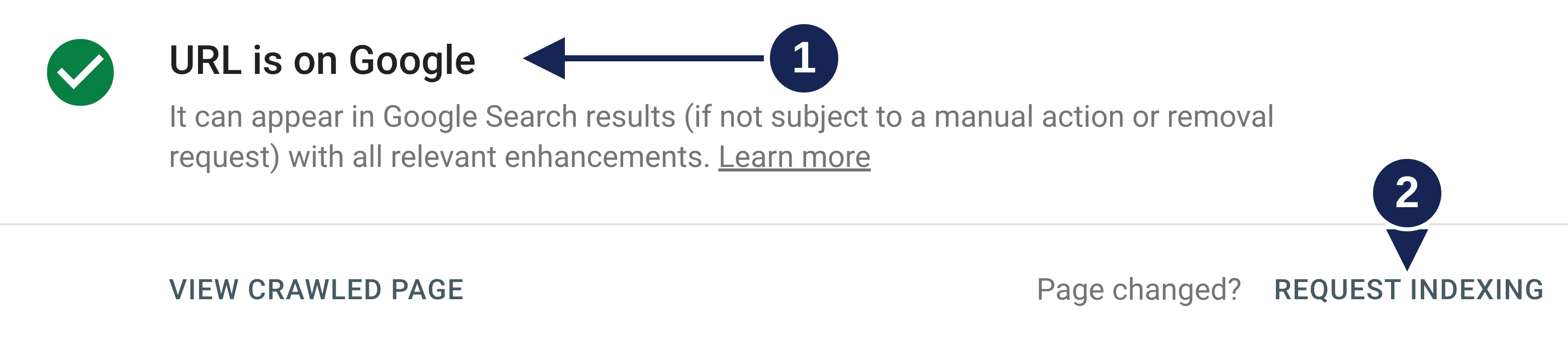
3. Read the status (1). This first result is the information in Google's index, not a live test of the page.
4. Select **Request indexing** (2).
Captured on 15 September 2026 for an already indexed documentation page. Account and URL details are cropped out. No indexing request was submitted. Open the inspection result at full size.
Before Google accepts the request, it runs a quick check for immediate indexing errors. If the page passes, Google adds it to its crawl queue. If the live test finds the page non-indexable, you cannot request indexing. [Google's URL Inspection help](https://support.google.com/webmasters/answer/9012289) describes this check.
If you cannot request indexing, check your permission on the property. Only an owner or a full user can request indexing.
## What the inspection status tells you
The status at the top of the result is the first thing to read. It tells you whether a request is the right next step.
| Status | What it means | Next step |
| -------------------- | ----------------------------------------------------------------------------------------------------------------------------------------------------------- | ----------------------------------------------------------------------------------------------------------------------------------------------------------- |
| URL is on Google | Google has the URL in its index. | If you changed the page, request indexing so Google recrawls it. If the page is missing from results, check the Manual Actions and Security Issues reports. |
| URL is not on Google | Google has not indexed this URL. The page indexing details give the reason, for example "Discovered - currently not indexed" or "URL is unknown to Google". | Fix any blocking cause first, then request indexing. For an unknown URL, also add it to your sitemap and link to it from your indexed pages. |
If you changed the page after the crawl time in the result, select **Test live URL** to check the current version. A live test does not cover every indexing condition. A page that passes it can still fail to be indexed.
## Fix blocking causes before you request
A request cannot override an instruction on the page. Check these first:
- **A `noindex` rule.** A `noindex` meta tag or `X-Robots-Tag` header tells Google not to index the page. Remove it if you want the page indexed.
- **A robots.txt rule.** If **Crawl allowed?** shows "No", a robots.txt rule blocks Google from crawling the page. Remove the rule that blocks it.
- **A different canonical.** If the page names another URL as its canonical, Google can index that URL instead.
- **A redirect.** The live test checks the redirect target, and it does not tell you that it followed a redirect. Inspect the final URL.
## How many requests you can make
Google sets a daily limit on indexing requests, and it does not publish the number. Requesting the same URL many times does not make Google crawl it faster. [Google's recrawl guide](https://developers.google.com/search/docs/crawling-indexing/ask-google-to-recrawl) states both.
If you hit the limit, or you have more than a few URLs, submit a sitemap instead. Use the Sitemaps report in Search Console, or list the sitemap in your `robots.txt`. Set `lastmod` only to the date of a significant page change. Google [retired its sitemap ping endpoint](https://developers.google.com/search/blog/2023/06/sitemaps-lastmod-ping), so a script that pings `google.com/ping` does nothing.
## After you request indexing
Google says that crawling can take from a few days to a few weeks after a request. A request is not a promise of inclusion: Google decides whether to index the page, and when.
To see the result, inspect the URL again later. The inspection result shows the last crawl time and the current status. Do not read an accepted request as an indexed page.
You can also check from outside Search Console. The [Google Index Checker](https://requestindexing.com/tools/google-indexing-checker) runs a Google `site:` search for one URL. That result is an estimate from public search output. It does not read URL Inspection.
## Can you request indexing through the API?
No API sends the same request as the **Request indexing** button. The [URL Inspection API](https://developers.google.com/webmaster-tools/v1/urlInspection.index/inspect) reads the stored index information for a URL. It has no live test and no request-indexing operation.
The Google Indexing API sends a different notification. Google documents it for job posting and livestream pages only. For an ordinary page, use URL Inspection or a sitemap. [Can you use the Google Indexing API for blog posts?](https://requestindexing.com/indexing-api-for-blog-posts) explains that decision.
---
- **Page:** Google Indexing API: What It Does and When to Use It
- **Source:** https://requestindexing.com/google-indexing-api
- **Description:** Understand Google's supported Indexing API use, notification responses, approval requirements, and how it differs from URL Inspection.
The Google Indexing API notifies Google when an eligible URL changes or disappears. Eligible means a page with `JobPosting`, or `BroadcastEvent` embedded in `VideoObject`. Ordinary website pages are outside that supported use, as [Google's quickstart](https://developers.google.com/search/apis/indexing-api/v3/quickstart) defines it.
If you publish ordinary articles, read [what to use for blog posts instead](https://requestindexing.com/indexing-api-for-blog-posts). For eligible job listings or livestream pages, start with one notification.
## A notification for one job listing
Suppose you update a job listing at `https://example.com/jobs/42`. Your client sends an authenticated POST to `https://indexing.googleapis.com/v3/urlNotifications:publish` with this body:
```json
{
"url": "https://example.com/jobs/42",
"type": "URL_UPDATED"
}
```
The body alone is only part of the call. The [Indexing API setup tutorial](https://requestindexing.com/google-indexing-api-tutorial) adds the credentials and sends it.
A successful response means Google may attempt to recrawl the URL. It does not prove that a crawl happened or that Google indexed the page. The metadata endpoint reports notification history, so a recent timestamp there cannot establish indexing either. See [Google's request and response meanings](https://developers.google.com/search/apis/indexing-api/v3/using-api).
To see whether Google returns the page in search, run a `site:` search for it with one of the [free indexing tools](https://requestindexing.com/tools). The [Google Index Checker](https://requestindexing.com/tools/google-indexing-checker) checks one URL. The [Bulk Indexing Checker](https://requestindexing.com/tools/bulk-indexing-checker) checks up to 10 URLs, or the first 10 URLs of a sitemap. The [Site Indexing Report](https://requestindexing.com/tools/site-indexing-report) estimates the indexed page count for a whole domain. Each result is an estimate from public search output, not a URL Inspection result.
An accepted notification does not set an indexing deadline. [October 2026 conference reporting](https://www.seroundtable.com/google-crawling-indexing-serving-data-42225.html) lists roughly 1.5 hours as typical for indexing processes, with slow cases reaching months or never.
Earlier discovery and crawling stages can delay that work. The figure does not measure notification-to-indexing time or API speed. See [Google Search timelines](https://nuxtseo.com/learn-seo/google-search-timelines).
## Choose the correct Google interface
| Interface | What you use it for | What the result tells you |
| ---------------------------------- | ---------------------------------------------------- | ------------------------------------------------------------------------ |
| Indexing API | Notify Google about changed or deleted eligible URLs | Notification receipt |
| Search Console URL Inspection tool | Inspect a URL and manually request indexing | Inspection information; a request remains subject to Google's processing |
| URL Inspection API | Read stored index information programmatically | Information about the version Google has in its index |
Google recommends [manual URL Inspection for a few URLs and sitemaps for many](https://developers.google.com/search/docs/crawling-indexing/ask-google-to-recrawl). The [URL Inspection API](https://developers.google.com/webmaster-tools/v1/urlInspection.index/inspect) has no live-test or request-indexing operation.
When you evaluate an indexing tool, ask which of these interfaces its request button calls. The [Indexly and SEO Gets comparisons](https://requestindexing.com/comparisons) check that against each vendor's documentation.
## Before you build
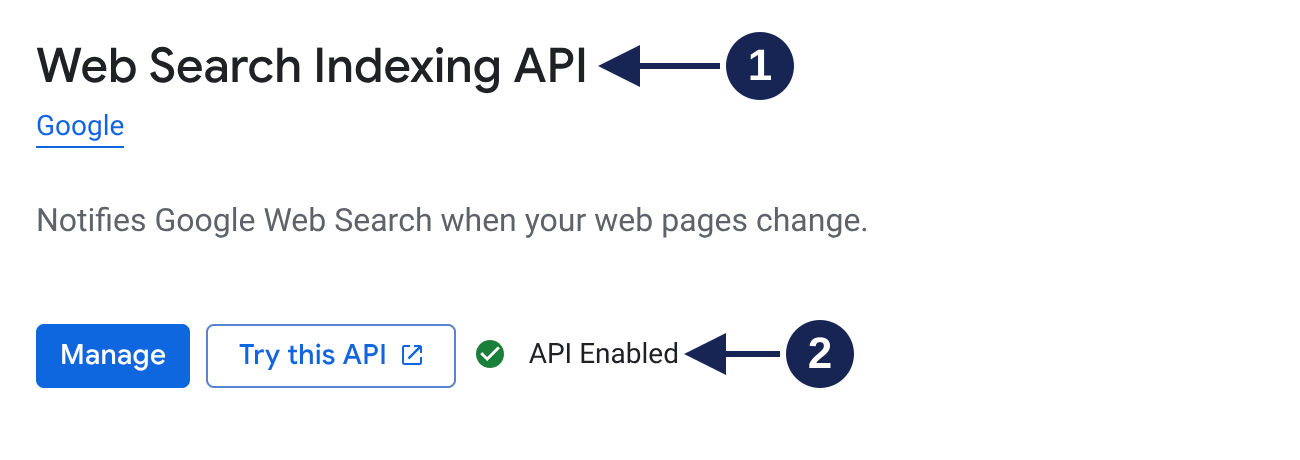
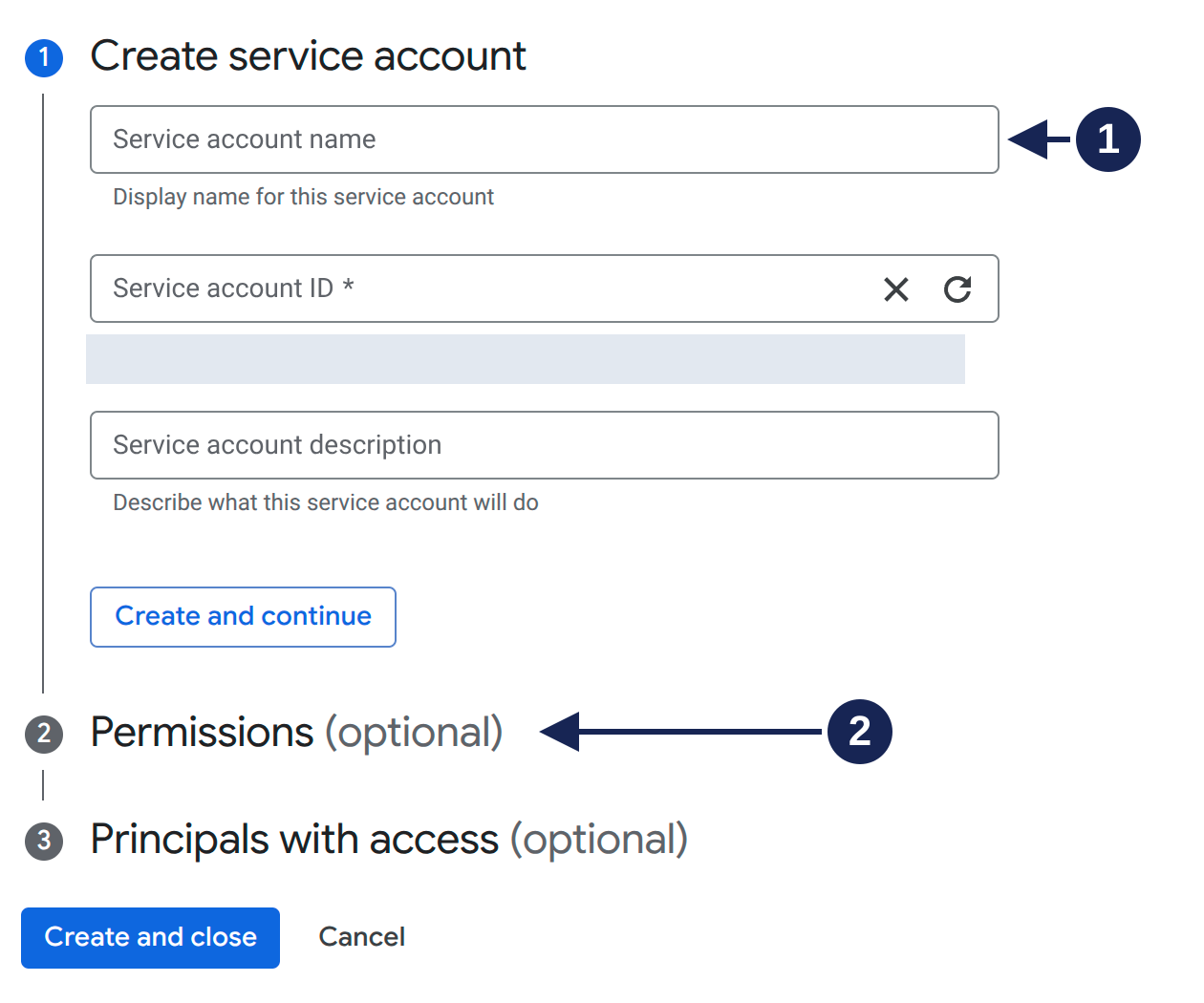
Google's documented setup uses a Cloud project with the API enabled, a service account, Search Console ownership, and the `https://www.googleapis.com/auth/indexing` scope. The service account needs delegated ownership of the property. Cloud project permissions and Search Console ownership are separate. Follow the [prerequisites](https://developers.google.com/search/apis/indexing-api/v3/prereqs).
The default publish quota is 200 requests per day per project for onboarding and testing. Google requires additional approval for usage and resource provisioning. Check the [approval and quota page](https://developers.google.com/search/apis/indexing-api/v3/quota-pricing) before planning a production integration.
To send one notification from code, start with the [Node.js example](https://requestindexing.com/google-indexing-api-node-js). Once that works for your eligible content, move on to [bulk requests with a result for each URL](https://requestindexing.com/bulk-submit-urls-google-indexing-api).
## When a page is removed
Use `URL_DELETED` after the URL returns `404` or `410`, or includes `noindex`. This tells Google about the removal; it does not prove removal has finished. The current [usage documentation](https://developers.google.com/search/apis/indexing-api/v3/using-api) covers those prerequisites.
*Correction, 15 September 2026: This guide now separates notification receipt from indexing and includes Google's approval requirement. Earlier descriptions of general-page use and guaranteed response timing were unsupported.*
---
- **Page:** Can You Use the Google Indexing API for Blog Posts?
- **Source:** https://requestindexing.com/indexing-api-for-blog-posts
- **Description:** Ordinary blog posts are outside Google's supported Indexing API use. Learn when to use URL Inspection or a sitemap, and what an accepted request proves.
**Ordinary blog posts are outside the Google Indexing API's supported use.** For a few new or updated posts, use Search Console's URL Inspection tool. For many URLs, submit a sitemap.
Google supports the API for pages with `JobPosting`, or `BroadcastEvent` embedded in `VideoObject`. A successful API response does not expand that scope. [Google's Indexing API quickstart](https://developers.google.com/search/apis/indexing-api/v3/quickstart) defines the supported content.
## What to do with a new blog post
Suppose you publish `https://example.com/blog/pruning-apple-trees`. It is an ordinary article, so you do not need an Indexing API integration for it.
1. Open the matching property in Search Console. You must be an owner or full user to request indexing.
2. Inspect the post's complete URL with the URL Inspection tool.
3. Review the status (1). For a new or updated page, choose **Request indexing** (2).
Captured on 15 September 2026 for an already indexed documentation page. Account and URL details are cropped out. No indexing request was submitted. Open the inspection result at full size.
A new post may show a different status.
This follows [Google's recrawl guidance](https://developers.google.com/search/docs/crawling-indexing/ask-google-to-recrawl). A request does not guarantee inclusion in search results. Repeating it for the same URL will not speed crawling. [How to request indexing in Google Search Console](https://requestindexing.com/request-indexing-google-search-console) explains each inspection status and the causes that block a request.
If you have many posts, use a sitemap instead of repeating this process for each one. Your publishing platform may already manage a sitemap; check its documentation before adding another integration.
To see which posts Google returns in search, give that sitemap to the [bulk indexing checker](https://requestindexing.com/tools/bulk-indexing-checker). It runs a `site:` search for each of the first 10 URLs. Past 10 posts, the [site indexing report](https://requestindexing.com/tools/site-indexing-report) estimates how many results a `site:` search returns for your whole domain. Neither tool reads Search Console, so use URL Inspection for the status Google stored.
Google must discover and crawl a URL before indexing it. [October 2026 conference reporting](https://www.seroundtable.com/google-crawling-indexing-serving-data-42225.html) puts typical new-URL discovery around 20 hours, with slow cases reaching weeks or never. Sitemap processing was around 24 hours, with slow cases reaching 14 days or never. Processing a sitemap does not prove its URLs were indexed.
These reported internal observations are context, not deadlines. Earlier stages can delay later ones. See [Google Search timelines](https://nuxtseo.com/learn-seo/google-search-timelines) before comparing elapsed time with indexing evidence.
## Replace old sitemap ping scripts
Some older tutorials send a request to `google.com/ping` whenever a sitemap changes. Google retired that endpoint; it returns `404`.
Submit the sitemap through Search Console or reference it in `robots.txt`. If your sitemap includes `lastmod`, use the date of a significant page change. Do not advance it just to make unchanged posts appear fresh. Google's [sitemap ping retirement announcement](https://developers.google.com/search/blog/2023/06/sitemaps-lastmod-ping) explains both changes.
## What if an API request already succeeded?
If your script sent a notification for the apple-tree post and received `200 OK`, you still need to check what happened to the page. For a `URL_UPDATED` notification, Google says a successful response means it may try to recrawl the URL soon. Crawling and indexing remain unconfirmed.
The API's metadata endpoint is also easy to misread. It reports when Google last received a notification, rather than the URL's indexing status. [Google's API usage guide](https://developers.google.com/search/apis/indexing-api/v3/using-api) documents both meanings.
Use URL Inspection to check Google's stored index information. If you automate that check, the [URL Inspection API](https://developers.google.com/webmaster-tools/v1/urlInspection.index/inspect) reads the version in Google's index. It does not test the live page or provide the manual tool's request-indexing action.
## Does using a third-party tool change the answer?
No. A tool that sends Indexing API notifications still uses the same Google interface. Easier authentication or a bulk-submit button does not change which content Google supports.
Before choosing an indexing tool, check what its button does. Does it send a notification, open Search Console, or read an inspection result? SEO Gets, for example, opens URL Inspection with the selected URL loaded, as the [SEO Gets comparison](https://requestindexing.com/comparisons/vs-seo-gets) shows.
Tag Parrot states that its service is closed. If you relied on it, [choose a replacement workflow by content type](https://requestindexing.com/comparisons/vs-tagparrot).
If your site also publishes eligible job listings or livestream pages, check those URLs separately from its blog. The [Google Indexing API guide](https://requestindexing.com/google-indexing-api) explains that workflow and its prerequisites.
*Correction, 15 September 2026: An earlier version said the API worked for ordinary blog posts and recommended Google's retired sitemap ping endpoint. It also described unverified penalty and detection patterns. This revision removes those claims and follows Google's documented scope.*
---
- **Page:** Google Indexing API with Node.js: Send One Notification
- **Source:** https://requestindexing.com/google-indexing-api-node-js
- **Description:** Use GoogleAuth and googleapis to send an eligible URL_UPDATED notification, inspect failures, and distinguish notification metadata from indexing status.
Use Google's `googleapis` client to send one `URL_UPDATED` notification from a server-side Node.js script. The example uses Node.js 24 and `googleapis` 181.0.0.
Before running it against Google, complete the [service-account setup](https://requestindexing.com/google-indexing-api-tutorial), including delegated property ownership and approval. Google supports only eligible `JobPosting` pages, or `BroadcastEvent` embedded in `VideoObject`; see [Google's quickstart](https://developers.google.com/search/apis/indexing-api/v3/quickstart).
## Install and run
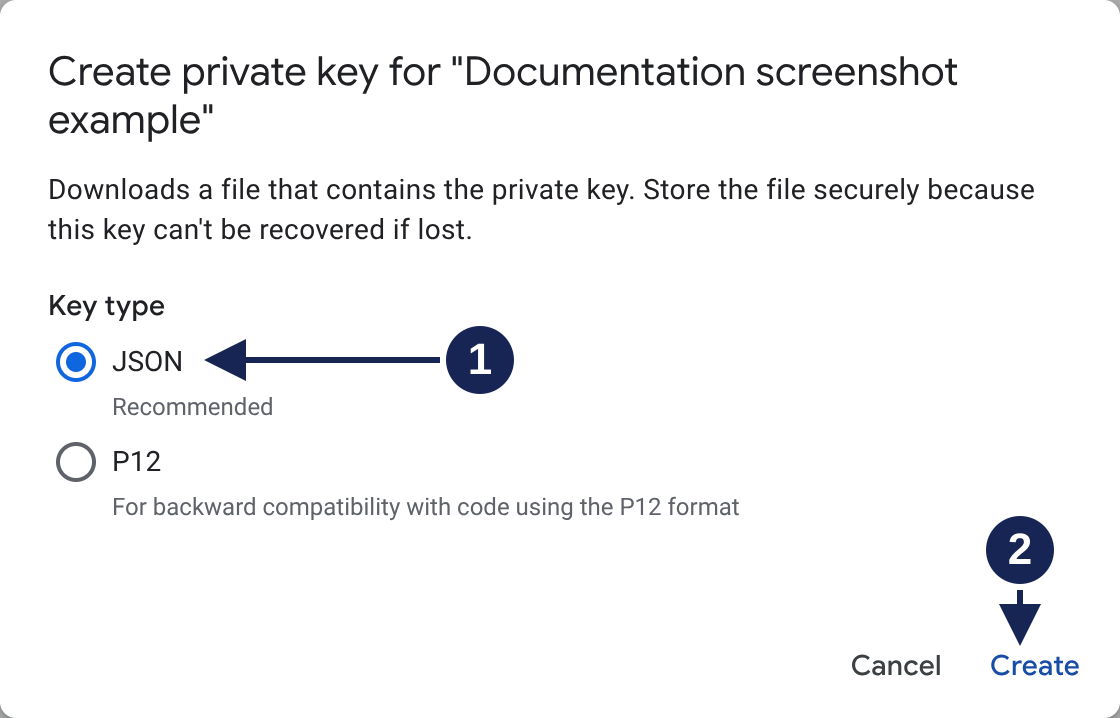
Keep the service-account JSON key outside Git and public directories. In a new local directory:
```bash
npm init -y
npm install googleapis@181.0.0
export GOOGLE_APPLICATION_CREDENTIALS="/absolute/path/to/service-account.json"
```
Save the following as `notify.mjs`:
```js
import { google } from 'googleapis'
const url = process.argv[2]
if (!url) {
throw new Error('Pass one eligible URL: node notify.mjs URL')
}
const auth = new google.auth.GoogleAuth({
scopes: ['https://www.googleapis.com/auth/indexing'],
})
const indexing = google.indexing({ version: 'v3', auth })
await indexing.urlNotifications.publish({
requestBody: { url, type: 'URL_UPDATED' },
}, { retry: false }).then(({ data }) => {
console.log(JSON.stringify({ status: 'notification-accepted', url, metadata: data }))
}).catch((error) => {
const details = error.response?.data?.error
console.error(JSON.stringify({
status: 'request-failed',
url,
httpStatus: error.response?.status,
reasons: details?.errors?.map(item => item.reason),
message: details?.message ?? error.message,
}))
process.exitCode = 1
})
```
```bash
node notify.mjs 'https://example.com/jobs/42'
```
The library reads the credential file through `GOOGLE_APPLICATION_CREDENTIALS`. `GoogleAuth` supplies the scoped authentication to the Indexing API client. The current [Google client](https://github.com/googleapis/google-api-nodejs-client) and [authentication documentation](https://github.com/googleapis/google-auth-library-nodejs) describe this pattern.
## What the output means
A successful response produces `notification-accepted`. That label reports receipt only. It says nothing about a crawl or an indexed page, so if you store the result, keep the receipt apart from indexing status.
[Google Search timelines](https://nuxtseo.com/learn-seo/google-search-timelines) explains why an accepted notification does not set an indexing deadline.
The failure path prints the HTTP status and, when Google returns them, its structured reasons. It also sets a nonzero exit code so a calling job can detect the failure. This small example disables automatic retries: find the cause first, then decide what to retry.
A `429` does not identify the exhausted limit by itself, and a `403` is not always an ownership error. Compare the reason and message with [Google's error reference](https://developers.google.com/search/apis/indexing-api/v3/core-errors) and the [quota guide](https://requestindexing.com/google-indexing-api-quota).
## Read notification metadata separately
In a script with the same `indexing` client and `url`, you can read the notification record:
```js
const { data } = await indexing.urlNotifications.getMetadata({ url })
console.log(data)
```
The snippet depends on that client and `url`, so it will not run on its own. Metadata describes the last notification Google received for that URL. It does not establish index status. [Google's usage guide](https://developers.google.com/search/apis/indexing-api/v3/using-api) documents the distinction.
For index information, use the separate [URL Inspection API](https://developers.google.com/webmaster-tools/v1/urlInspection.index/inspect) and its [Search Console authorization scope](https://gscdump.com/learn-google-search-console/api/authentication). For a one-off check without code, the [Google index checker](https://requestindexing.com/tools/google-indexing-checker) runs a `site:` search for a single URL and reports whether it returns a result.
## When you have several URLs
For a list of eligible URLs, start with [sequential submission](https://requestindexing.com/bulk-submit-urls-google-indexing-api). It is easier to inspect each result before adding multipart batching or a shared queue.
Verification here used Node.js 24.18.0 and the actual installed client with a mocked credential provider and intercepted HTTP transport. It checked request construction and success/failure output. It did not establish valid credentials, property ownership, or a live indexing outcome.
---
- **Page:** Bulk Indexing API Requests: Track Every URL Result
- **Source:** https://requestindexing.com/bulk-submit-urls-google-indexing-api
- **Description:** Send eligible URLs sequentially with Node.js, understand multipart batches, and keep per-URL results separate from shared project quota.
For several eligible URLs, start with a sequential sender that records each response. Multipart batching is another option when reducing HTTP connections matters. In either case, Google counts the individual API requests.
The Indexing API supports `JobPosting`, or `BroadcastEvent` embedded in `VideoObject`. Complete [the single-request setup](https://requestindexing.com/google-indexing-api-tutorial) and check your project's approved quota before sending a list. Google describes the default quota as onboarding and testing capacity in its [approval documentation](https://developers.google.com/search/apis/indexing-api/v3/quota-pricing).
## Start with separate requests
This example sends one notification at a time. It removes identical input URLs and reports every attempted request. It does not reserve quota, persist a queue, or coordinate with other processes.
Install `googleapis` 181.0.0 as shown in the [Node.js guide](https://requestindexing.com/google-indexing-api-node-js), then set `GOOGLE_APPLICATION_CREDENTIALS` to your private service-account file.
Create `urls.txt` with a small set of eligible URLs you own, one per line:
```text
https://example.com/jobs/42
https://example.com/jobs/43
```
Save this as `submit-many.mjs`:
```js
import { readFile } from 'node:fs/promises'
import { google } from 'googleapis'
const input = process.argv[2]
if (!input) {
throw new Error('Pass a URL file: node submit-many.mjs urls.txt')
}
const urls = [...new Set((await readFile(input, 'utf8'))
.split(/\r?\n/)
.map(url => url.trim())
.filter(Boolean))]
const auth = new google.auth.GoogleAuth({
scopes: ['https://www.googleapis.com/auth/indexing'],
})
const indexing = google.indexing({ version: 'v3', auth })
for (const url of urls) {
await indexing.urlNotifications.publish({
requestBody: { url, type: 'URL_UPDATED' },
}, { retry: false }).then(({ data }) => {
console.log(JSON.stringify({ status: 'notification-accepted', url, metadata: data }))
}).catch((error) => {
const details = error.response?.data?.error
console.error(JSON.stringify({
status: 'request-failed',
url,
httpStatus: error.response?.status,
reasons: details?.errors?.map(item => item.reason),
message: details?.message ?? error.message,
}))
process.exitCode = 1
})
}
```
```bash
node submit-many.mjs urls.txt
```
The loop keeps going after a failure, so every input gets a result. On a large job, stop the run when a shared access or quota problem affects the remaining URLs, and diagnose the cause before you retry. The script disables automatic retries and keeps no shared quota count; plan that accounting separately.
## Multipart batches use a different wire format
Google allows up to 100 calls in a multipart batch, with each inner request no larger than 1 MB. Ten publish calls in one HTTP request still count as ten requests. See [Google's batch guidance](https://developers.google.com/search/apis/indexing-api/v3/using-api).
The following static illustration shows two inner notifications. It is not a runnable HTTP client or response parser. A real request needs authentication and correctly encoded multipart boundaries and line endings.
```http
POST /batch HTTP/1.1
Host: indexing.googleapis.com
Content-Type: multipart/mixed; boundary=notifications
--notifications
Content-Type: application/http
Content-ID:
POST /v3/urlNotifications:publish HTTP/1.1
Content-Type: application/json
{"url":"https://example.com/jobs/42","type":"URL_UPDATED"}
--notifications
Content-Type: application/http
Content-ID:
POST /v3/urlNotifications:publish HTTP/1.1
Content-Type: application/json
{"url":"https://example.com/jobs/43","type":"URL_UPDATED"}
--notifications--
```
## Read every result
For a synthetic example, job 42 receives `200` while job 43 receives a quota error. Record the first as a notification receipt and the second as a failed request. Do not mark both successful because the outer batch request completed.
[Google Search timelines](https://nuxtseo.com/learn-seo/google-search-timelines) explains why an accepted notification does not set an indexing deadline.
Do not depend on input order to predict which requests consume the remaining quota. Inspect each response and retain its URL or correlation identifier. The sequential example's intercepted test includes one success and one quota failure; it checks those results stay distinct.
Before scaling up, decide how all workers sharing a Google Cloud project will account for requests. A counter inside one script misses other workers and resets when the process restarts. The [quota guide](https://requestindexing.com/google-indexing-api-quota) separates project limits, reset times, and tool-specific limits.
The executable example was checked with Node.js 24.18.0 and intercepted Google client requests, without any authenticated submission. A successful notification still does not prove crawling or indexing. To see which URLs Google returns in search later, paste up to 10 of them into the [bulk indexing checker](https://requestindexing.com/tools/bulk-indexing-checker), which runs a `site:` search for each one.
---
- **Page:** Google Indexing API Setup: Your First Notification
- **Source:** https://requestindexing.com/google-indexing-api-tutorial
- **Description:** Set up a service account, property ownership and scoped Node.js client for your first eligible Indexing API notification.
Start with one eligible URL, such as a real job listing at `https://example.com/jobs/42`. Google supports the Indexing API for `JobPosting`, or `BroadcastEvent` embedded in `VideoObject`. Ordinary blog posts need [URL Inspection or a sitemap instead](https://requestindexing.com/indexing-api-for-blog-posts).
Google's default quota covers onboarding and testing. Usage and resource provisioning need additional approval; use the form linked from [Google's approval page](https://developers.google.com/search/apis/indexing-api/v3/quota-pricing).
## Set up credentials and property access
[Google's prerequisites](https://developers.google.com/search/apis/indexing-api/v3/prereqs) separate Cloud setup from Search Console ownership. Complete both before running the script.
### Enable the Indexing API
Create or select a Google Cloud project. In the [API Library](https://console.cloud.google.com/apis/library/indexing.googleapis.com), find **Web Search Indexing API** (1) and enable it for that project. If the API is already enabled, you will see **Manage** and **API Enabled** (2).
Captured on 15 September 2026 in a project where the API was already enabled. Account and project details are cropped out. Open the API status at full size.
### Create the service account and key
Open **IAM & Admin → Service Accounts → Create service account**. Give the account a name (1). The **Permissions (optional)** step (2) grants Cloud IAM roles; it is not required for this Indexing API setup.
Captured on 15 September 2026. The project email preview is redacted. The form was cancelled without creating an account. Open the service account form at full size.
After creating the account, open its **Keys** tab and choose **Add key → Create new key**. Select **JSON** (1), then **Create** (2) to download the key file.
Captured on 15 September 2026 using a temporary service account. The dialog was cancelled without creating a key, and the account was deleted afterward. Open the key dialog at full size.
Google's [key creation guide](https://docs.cloud.google.com/iam/docs/keys-create-delete) covers this step. Keep the downloaded JSON file outside Git, browser code, and public directories.
### Grant Search Console ownership
Verify ownership of the matching property in Search Console. Open **Settings → Users and permissions → Add user**.
Enter the service account's `client_email` in **Email address** (1). Select **Owner** under **Permission** (2), then choose **Add**. This grants delegated ownership, as required by [Google's owner setup](https://developers.google.com/search/apis/indexing-api/v3/prereqs).
Captured on 15 September 2026. The dialog was cancelled with the email field empty; no access was granted. Open the permissions dialog at full size.
Being a Cloud project owner does not grant ownership of a Search Console property. Check the property covers the URL you intend to notify Google about.
## Send the first notification
Use Node.js 24 and Google's official `googleapis` client. In a new local directory, install the tested version and point the credential variable at your JSON file:
```bash
npm init -y
npm install googleapis@181.0.0
export GOOGLE_APPLICATION_CREDENTIALS="/absolute/path/to/service-account.json"
```
Save this as `notify.mjs`:
```js
import { google } from 'googleapis'
const url = process.argv[2]
if (!url) {
throw new Error('Pass one eligible URL: node notify.mjs URL')
}
const auth = new google.auth.GoogleAuth({
scopes: ['https://www.googleapis.com/auth/indexing'],
})
const indexing = google.indexing({ version: 'v3', auth })
await indexing.urlNotifications.publish({
requestBody: { url, type: 'URL_UPDATED' },
}, { retry: false }).then(({ data }) => {
console.log(JSON.stringify({ status: 'notification-accepted', url, metadata: data }))
}).catch((error) => {
const details = error.response?.data?.error
console.error(JSON.stringify({
status: 'request-failed',
url,
httpStatus: error.response?.status,
reasons: details?.errors?.map(item => item.reason),
message: details?.message ?? error.message,
}))
process.exitCode = 1
})
```
Run it with your eligible URL:
```bash
node notify.mjs 'https://example.com/jobs/42'
```
The example uses [GoogleAuth's credential discovery](https://github.com/googleapis/google-auth-library-nodejs) and the indexing scope. The `.mjs` extension makes the file an ES module. Replace the example URL with a page you own that meets Google's supported-content requirements.
## Read the response correctly
`notification-accepted` is the script's label for a successful API response. It does not mean the page was indexed. Google may attempt a recrawl after receiving `URL_UPDATED`; [its usage documentation](https://developers.google.com/search/apis/indexing-api/v3/using-api) defines that response. To check the listing later, open it in Search Console's URL Inspection tool, or run a quick `site:` search for it with the [Google index checker](https://requestindexing.com/tools/google-indexing-checker).
[Google Search timelines](https://nuxtseo.com/learn-seo/google-search-timelines) explains why an accepted notification does not set an indexing deadline.
On failure, the script prints the status, reasons, and message. Read them together, because an ownership problem and an exhausted quota need different fixes. The script disables automatic retries, so it will not keep submitting while you diagnose the problem.
Verification used the real client with intercepted HTTP responses. Credential exchange and live Google notifications remain untested. For metadata and error handling details, continue with the [Node.js guide](https://requestindexing.com/google-indexing-api-node-js). For approval and rate limits, use the [quota guide](https://requestindexing.com/google-indexing-api-quota).
---
- **Page:** Request Indexing vs Indexly: Compare the Workflow
- **Source:** https://requestindexing.com/comparisons/vs-indexly
- **Description:** Compare Indexly's advertised automation and AI visibility features with Request Indexing's open-source notification workflow.
Indexly bundles automated indexing with AI visibility and content features. Request Indexing covers less ground. It shows indexing information, sends Google Indexing API notifications, and publishes its source. Start with the features your team needs.
We compared Indexly's public documentation with Request Indexing's source on 15 September 2026. We did not sign in to test either service.
## What Indexly offers
[Indexly's current plans](https://indexly.ai/pricing) advertise automated indexing plus prompt and citation tracking. Higher plans add CMS integrations, API access, and white-label features. Its [indexing use cases](https://indexly.ai/use-cases/indexing) cover several publishing platforms.
If you want content automation and AI visibility reporting in one place, that breadth may suit you. The feature list describes the whole platform, so check which plan includes each feature you need.
## What Request Indexing implements
Before it sends anything, the [notification endpoint](https://github.com/harlan-zw/requestindexing.com/blob/cf640ac56542cca8850b2ce3ab773f35c8910e21/apps/app/server/api/indexing/%5Burl%5D.post.ts) reads the URL's notification metadata. If it finds an update notification from the last 48 hours, it skips the publish. That window is an application policy. It tells you nothing about whether Google indexed the URL.
Request Indexing also reads stored indexing information through gscdump. Its [MIT licensed source](https://github.com/harlan-zw/requestindexing.com/blob/main/LICENSE) is open to inspect. Self-hosting takes your own infrastructure and configuration, and this comparison did not confirm a one-click setup.
## Questions to settle before choosing
| Your question | What to check |
| ----------------------------------------------- | ------------------------------------------------------------------------------------------------------------------- |
| Do I need AI visibility and content automation? | Indexly's model, prompt and CMS features on each plan |
| Do I need source access? | Request Indexing's repository and deployment requirements |
| How many requests can I send? | Each tool's own limit, and Google's project quota |
| Will a notification prove indexing? | No. Check index status separately, for example with the free [Google Index Checker](https://requestindexing.com/tools/google-indexing-checker) |
Request Indexing is a free beta in the inspected code. Its tool limit is shared across your calls and is separate from Google's quota; [the quota guide](https://requestindexing.com/google-indexing-api-quota) explains which limit applies. For Indexly's billing options, see its [pricing page](https://indexly.ai/pricing), and check the billing interval and included features before you pick a plan.
## Check your content type first
If a tool sends Google Indexing API notifications, Google's scope still applies. The API supports pages with `JobPosting`, or `BroadcastEvent` embedded in `VideoObject`, as [Google's quickstart](https://developers.google.com/search/apis/indexing-api/v3/quickstart) defines. CMS support shows how a vendor connects to your site. It does not show which submission mechanism the vendor uses, and it cannot widen Google's scope.
For ordinary posts, read [the supported alternatives for blog posts](https://requestindexing.com/indexing-api-for-blog-posts) before you choose a submission tool. For eligible pages, the [Indexing API guide](https://requestindexing.com/google-indexing-api) explains what notification receipt can tell you.
*Correction, 15 September 2026: Removed unverified retention comparisons, trial terms, future features and unlimited-data claims.*
---
- **Page:** Request Indexing vs SEO Gets: Notifications and Reporting
- **Source:** https://requestindexing.com/comparisons/vs-seo-gets
- **Description:** Compare direct Indexing API notifications with SEO Gets analytics, indexing history, and its Search Console inspection shortcut.
SEO Gets is worth a look if you need Search Console analysis and indexing history. Request Indexing is an open-source application that sends Google Indexing API notifications directly. Start with what happens after you click each product's request button.
Checked 15 September 2026 against SEO Gets' documentation and Request Indexing's source. We did not run a signed-in comparison of the two services.
## What happens when you request indexing?
| Product | Documented or inspected action |
| ---------------- | ----------------------------------------------------------------------------------------------------------------- |
| SEO Gets | Opens Search Console's URL Inspection tool with the selected URL loaded |
| Request Indexing | Sends an Indexing API notification with your connected Google credentials, after a check for recent notifications |
SEO Gets explains its shortcut on its [Index Reporting](https://seogets.com/features/index-reporting) page. You can read Request Indexing's behavior in its [notification endpoint](https://github.com/harlan-zw/requestindexing.com/blob/cf640ac56542cca8850b2ce3ab773f35c8910e21/apps/app/server/api/indexing/%5Burl%5D.post.ts).
For an ordinary blog post, opening Search Console can be the right next step. Google's API notification path supports only eligible job and livestream pages. Read [which Google interface fits a blog post](https://requestindexing.com/indexing-api-for-blog-posts) before you compare convenience.
## SEO Gets reporting and storage
SEO Gets offers Free and Core plans. Its current [pricing page](https://seogets.com/pricing) lists a 16-month base historical window. Five-year storage is an add-on, so connecting a property does not include it.
The [Index Reporting page](https://seogets.com/features/index-reporting) describes indexing history and weekly alerts through its Super Sites add-on. The [extended storage documentation](https://seogets.com/features/how-to-extend-gsc-historical-data) covers the longer search performance history. Read the current add-on terms next to the base plan.
If you manage several properties, the [feature list](https://seogets.com/features) also includes content groups, portfolio analysis, and client reporting. Those may matter more to you than where a request-indexing button sits.
## Request Indexing's scope and limits
Request Indexing's [source is MIT licensed](https://github.com/harlan-zw/requestindexing.com/blob/main/LICENSE). The inspected implementation is a free beta and reads stored indexing states through gscdump. You can follow the request path in the source.
This comparison did not confirm an unlimited row allowance or a hosted retention guarantee for Request Indexing. Its own request limits also differ from Google's project quotas. If request volume affects your choice, read [which quota applies to you](https://requestindexing.com/google-indexing-api-quota).
## Which task matters most?
If you want portfolio reporting and a history of indexing changes, look at SEO Gets' reporting and add-ons. If you want to inspect or adapt an open-source notification workflow for eligible content, look at Request Indexing's code and setup requirements.
Either way, a request is not a promise that Google will index the page. The [Indexing API guide](https://requestindexing.com/google-indexing-api) separates notification receipt from inspection results.
*Correction, 15 September 2026: An earlier version said SEO Gets lacked indexing requests and charged from day one. SEO Gets offers a free plan and an inspection shortcut. Earlier unverified Request Indexing retention and row-limit claims are removed.*
---
- **Page:** Tag Parrot Is Closed: Choosing a Replacement Workflow
- **Source:** https://requestindexing.com/comparisons/vs-tagparrot
- **Description:** Tag Parrot states its service is closed. Choose a replacement based on your content type, inspection needs, and Google's supported request methods.
**Tag Parrot states that its service is closed and indexing is unavailable.** Its [pricing page](https://tagparrot.com/pricing), checked on 15 September 2026, also says existing subscriptions were cancelled and refunded. The notice gives no closure date.
Start with the task you need to replace. Do you need to send notifications, or to find out which pages are indexed?
## For ordinary blog or product pages
Use Google's supported methods for ordinary pages: URL Inspection for a few URLs and a sitemap for many. To request indexing by hand, you must be an owner or full user of the property. [Google's recrawl guidance](https://developers.google.com/search/docs/crawling-indexing/ask-google-to-recrawl) explains both options.
A third-party wrapper around the Indexing API does not widen what the API supports. Google limits it to `JobPosting`, or `BroadcastEvent` embedded in `VideoObject`. See [Google's quickstart](https://developers.google.com/search/apis/indexing-api/v3/quickstart).
If you used an API tool to submit ordinary articles, read [what to use for blog posts instead](https://requestindexing.com/indexing-api-for-blog-posts) before you rebuild that workflow somewhere else.
## For eligible job or livestream pages
Request Indexing's [notification endpoint](https://github.com/harlan-zw/requestindexing.com/blob/cf640ac56542cca8850b2ce3ab773f35c8910e21/apps/app/server/api/indexing/%5Burl%5D.post.ts) sends Google Indexing API notifications directly. Before it sends one, it checks recent notification metadata and applies its own app limit. The [quota guide](https://requestindexing.com/google-indexing-api-quota) explains how a tool's limit differs from Google's.
You can also build your own client. The [setup tutorial](https://requestindexing.com/google-indexing-api-tutorial) covers Google's documented service-account prerequisites and approval requirements.
Neither option means the URL will be indexed. Google's [usage guide](https://developers.google.com/search/apis/indexing-api/v3/using-api) describes a successful notification as something that may trigger a recrawl.
## Plan the replacement
1. List the URLs you still publish, from your CMS or sitemap. Do not count on Tag Parrot account exports still being available.
2. Separate ordinary pages from eligible Indexing API content.
3. Inspect important URLs in Search Console before you decide what to request again. An old submission record says nothing about their status today. For a first pass over many URLs, the free [bulk indexing checker](https://requestindexing.com/tools/bulk-indexing-checker) checks up to 10 at a time against Google search results.
4. Choose a replacement for each task: sitemap maintenance, inspection reporting, or eligible API notifications.
Request Indexing's [MIT licensed repository](https://github.com/harlan-zw/requestindexing.com/blob/main/LICENSE) gives you source access. This comparison does not verify a hosted retention guarantee, an import from Tag Parrot, or an automatic migration.
*Correction, 15 September 2026: This page previously grouped Tag Parrot with several other vendors and recommended it as an active service. The revision follows Tag Parrot's current closure notice and removes unsupported group-wide claims.*